Everything you need, ready from the first boot
A tour of what makes LeiOS a complete, comfortable operating system for work, play and development.
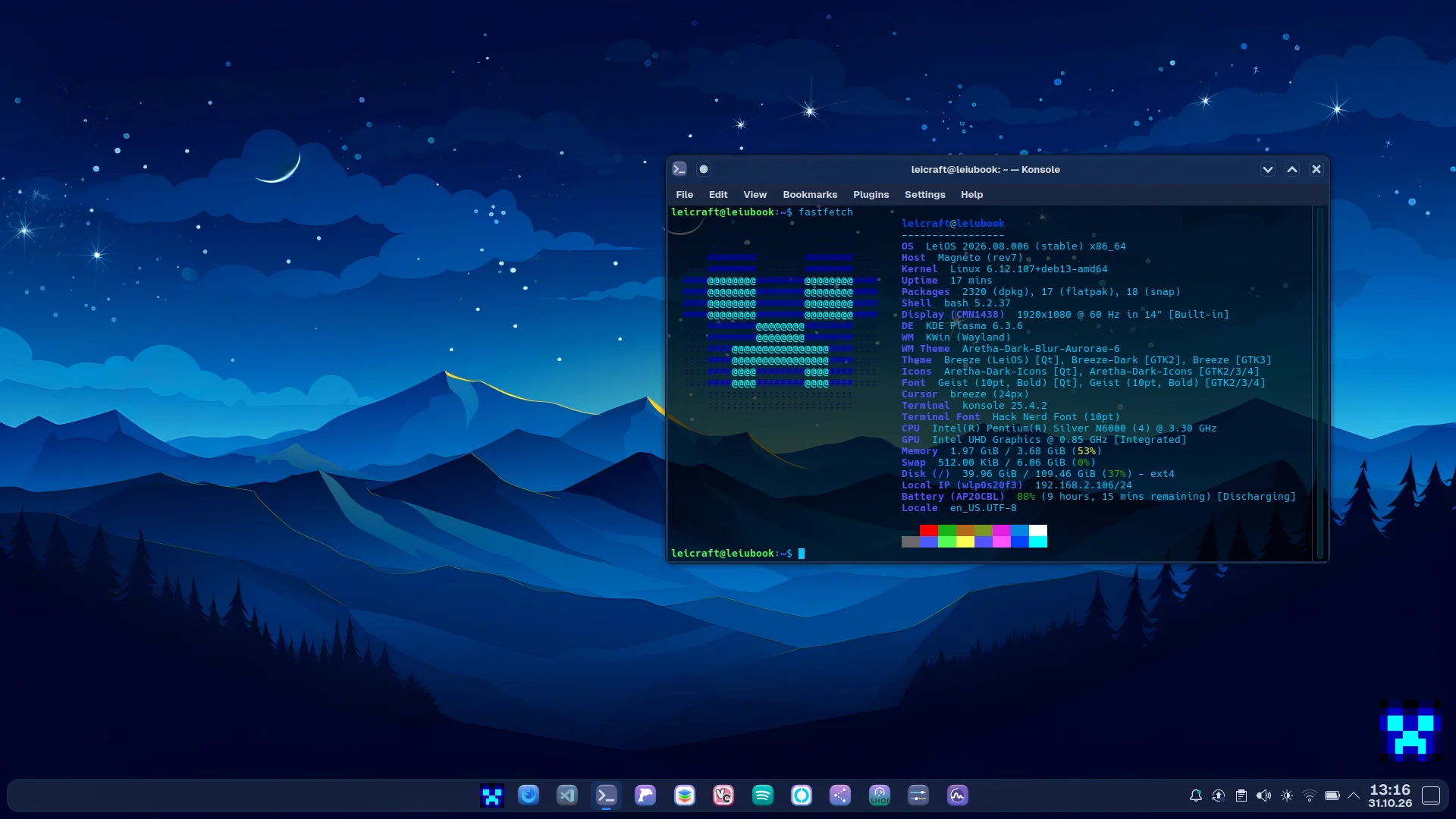
A desktop that feels like home
LeiOS uses KDE Plasma 6, one of the most polished and flexible desktops anywhere. A taskbar at the bottom, a start menu, a system tray and a clock: if you know Windows, you know Plasma. LeiOS gives it a consistent look from the boot menu to the login screen.
Get to know the desktop- The LeiOS theme: its own panel layout, a dark style and icons based on Aretha Dark, and the Geist font
- Matching boot menu, boot splash and login screen, plus the LeiOS wallpapers
- Snap windows to the edges, use virtual desktops, search everything from the start menu
- Every look is only a default: change themes, panels and fonts in System Settings
The apps you need, installed or one click away
LeiOS comes with a full set of everyday apps. Anything else is in Discover, the built-in app store, which installs apps from Flathub, the Snap Store and Debian without visiting a single download site.
How to install apps- Firefox and Firefox Developer Edition, straight from Mozilla and always current
- LibreOffice Writer, Calc and Impress: opens and saves Word, Excel and PowerPoint files
- KMail and KOrganizer for email and calendars, Okular for PDFs, Gwenview and GIMP for pictures
- Spotify, Discord, Steam, VS Code, OBS, Zoom and thousands more from Flathub and the Snap Store, ready to use
Updates on your schedule
Discover tells you when updates are ready and installs them when you click Update. Nothing restarts your computer behind your back. Debian's security team keeps the base safe, and LeiOS improvements roll in as tested releases.
Updates and maintenance- One place for system, app and Flatpak updates, with a notification in the system tray
- Firmware updates for supported devices, also through Discover
- LeiOS releases are tested in the testing channel before they reach stable
- No reinstalling every few years: LeiOS keeps updating in place
Fast, even with little memory
LeiOS is tuned to stay responsive when memory gets tight. That makes a real difference on older laptops with 4 GB of RAM.
Performance tweaks- Compressed swap in memory (zram): up to half your RAM, at most 8 GiB, before anything goes to disk
- Memory settings tuned for zram out of the box
- An optional low-memory package with earlyoom and extra protection against freezes
- Power profiles for battery life or speed, one click away in the battery menu
Secure without the hassle
LeiOS starts on computers with Secure Boot turned on, can encrypt your whole disk, and gets its software from signed repositories instead of random downloads.
Secure Boot explained- Secure Boot with the same signed boot chain as Debian (shim, GRUB and the kernel)
- Optional full-disk encryption, a single checkbox in the installer
- Security updates from the Debian security team
- No ads, no account, no usage data collected by LeiOS
Hardware support built in
LeiOS includes the firmware that most computers need, so Wi-Fi, graphics and sound work right after installing. You can test everything in the live system before you install.
Hardware and drivers- Firmware for Intel, AMD, Realtek and Atheros chips, plus CPU microcode updates
- Debian's long-term-support Linux kernel, with headers ready for extra drivers
- Printers, Bluetooth and phones (KDE Connect) set up from System Settings
- NVIDIA graphics with Debian's driver, installed with one command
Ready for development
Under the friendly surface is a full Debian system. The tools developers reach for first are already installed, and LeiOS has its own package repository where you can publish software for every LeiOS user.
Developer docs- Git, GCC, make, Python 3, curl and wget on the first boot
- Konsole with the LeiOS profile and Hack Nerd Font, plus fastfetch
- The whole Debian archive through APT, and Flathub for desktop apps
- Publish your own packages through the LeiOS Developer Hub
Accessible and multilingual
The installer and the desktop speak many languages, and accessibility tools are part of the system, not an afterthought.
- Choose your language, keyboard and region formats in the installer
- The Orca screen reader, a screen magnifier and KMouth for text-to-speech
- Accessibility options for the keyboard, mouse and colors in System Settings
- English with German formats (en_DE) available for people living in Germany
Technical details
For the curious: what LeiOS is made of.
- Base
- Debian 13 "trixie"
- Kernel
- Debian's Linux 6.12 LTS kernel
- Desktop
- KDE Plasma 6 (Wayland, X11 session available)
- Installer
- Calamares
- Software
- APT (.deb), Flatpak and Snap, with Discover as the app store
- Repositories
- Debian, the LeiOS repository, Mozilla (Firefox), Flathub, the Snap Store
- Boot
- UEFI with Secure Boot, or BIOS
- Storage
- ext4 by default, Btrfs available, LUKS encryption
- Memory
- zram compressed swap
- Images
- 64-bit x86 (amd64)
- License
- Free and open source; LeiOS's own code is AGPL-3.0